I Phone help

Mad Eyed Screamer

Moderator
Joined
26 Nov 2010
Messages
51,281
Location
Did I mention I'd been on Eggheads?
I’ve obviously touched some key or other and have changed something.
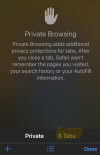
Here is my screen. As you can see it’s all black with white keys. Up until a few days ago it was the opposite way round and ever since, when I go on Blue Moon I get that privacy shit message and I have to log in to BM every fucking time! Even with the box “keep me logged in” ticked.
Can anyone tell me how to reverse it?
Thanks

IMG_3844.jpeg
 
I’ve obviously touched some key or other and have changed something.
Here is my screen. As you can see it’s all black with white keys. Up until a few days ago it was the opposite way round and ever since, when I go on Blue Moon I get that privacy shit message and I have to log in to BM every fucking time! Even with the box “keep me logged in” ticked.
Can anyone tell me how to reverse it?
Thanks
View attachment 163104
Open settings
Scroll down to display and brightness
There should be 2 snippets of screen with Light and Dark under them
Click dark

Not sure if the privacy thing is linked but give it a go. If not try resetting your cookies in BM settings.
 
Get on to Safari -go to the Tab Screen (the Squares thingy) bottom right and Tap it - on mine I get a hand showing with Private Browsing -so I’m assuming you should get a similar message to quit Private Browsing (or whatever)
 
Just in case it's not obvious from the posts above, it's defaulting to 'Private Browsing' which won't keep any cookies or log the website in your browsing history.

Any website visited using this will ask you to accept or deny cookies every time you visit and will not keep you logged in as the cookies are destroyed when you exit the site.
 

Don't have an account? Register now and see fewer ads!

SIGN UP
Back
Top