Have I ruined my CPU?

JRockBlues

Well-Known Member
Joined
3 Nov 2015
Messages
16,285
Location
Near where the "Welcome to Manchester" sign was
Desktop home computer has been giving me CPU Fan error messages for a while on boot-up and I haven't been in a position to get it resolved until now. Cleaned out the case as best I could but it made no difference. It has been necessary to continue to use the pc but the more I do each session then the slower it gets as the cpu temperature rises. I can still use it for upto a few hours at a time until it becomes almost unresponsive. Have I left it too late to just replace the fan?

On a totally related note: Anybody recommend a computer repairs person who does home visits in the Sale area?
 
Desktop home computer has been giving me CPU Fan error messages for a while on boot-up and I haven't been in a position to get it resolved until now. Cleaned out the case as best I could but it made no difference. It has been necessary to continue to use the pc but the more I do each session then the slower it gets as the cpu temperature rises. I can still use it for upto a few hours at a time until it becomes almost unresponsive. Have I left it too late to just replace the fan?

On a totally related note: Anybody recommend a computer repairs person who does home visits in the Sale area?
They have thermal overload shutdown built in so the CPU should be fine. Couldn't help you with local help.
 
Thanks both for the responses.

The fan error could be rectified by..

Changing the fan for a new one
Plugging the fan into a different CPU fan header on the motherboard if one is available

What are the specs?

We can move from there and work backwards.
Processor (CPU)
Intel® Core™ i9 Eight Core Processor i9-9900K (3.6GHz) 16MB Cache

Motherboard
ASUS® ROG MAXIMUS XI HERO: ATX, LGA1151, USB 3.1, SATA 6GBs - RGB Ready

Processor Cooling
PCS FrostFlow 120 Series High Performance Liquid Cooler

Thermal Paste
STANDARD THERMAL PASTE FOR SUFFICIENT COOLING
 
processor Cooling
PCS FrostFlow 120 Series High Performance Liquid Cooler


That could be your issue, could you take a temp reading? You can get your core temp through bios or by running this small program, if your AIO (All In One cooler) is failing it could explain everything.

Is your fan connected to the AIO pump header and not the CPU fan header? Depending on the motherboard there is also a setting in the bios for either fan or pump also.

 
Thanks both for the responses.


Processor (CPU)
Intel® Core™ i9 Eight Core Processor i9-9900K (3.6GHz) 16MB Cache

Motherboard
ASUS® ROG MAXIMUS XI HERO: ATX, LGA1151, USB 3.1, SATA 6GBs - RGB Ready

Processor Cooling
PCS FrostFlow 120 Series High Performance Liquid Cooler

Thermal Paste
STANDARD THERMAL PASTE FOR SUFFICIENT COOLING
you need ALL of that to access Bluemoon? I apologise for the number of GIF's I've been posting! ;-)
 
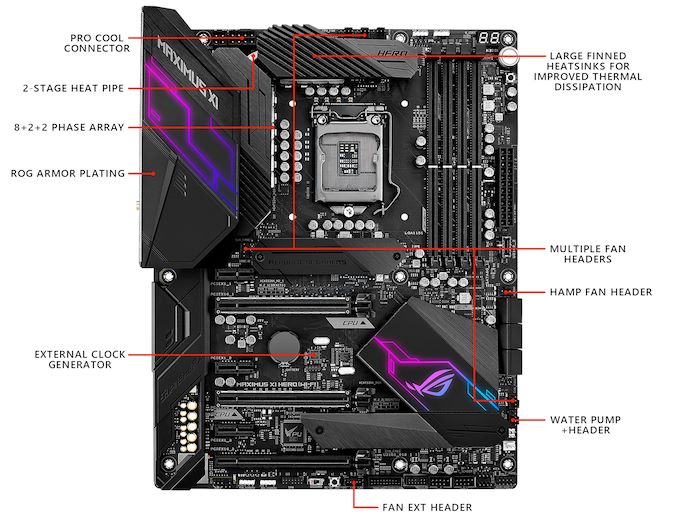
2.%20ROG%20Maximus%20XI%20Hero%20Wi-Fi%20Top%20Overview_575px.jpg


Your AIO should be connected to the water pump header bottom right as shown.
 
processor Cooling
PCS FrostFlow 120 Series High Performance Liquid Cooler


That could be your issue, could you take a temp reading? You can get your core temp through bios or by running this small program, if your AIO (All In One cooler) is failing it could explain everything.

Is your fan connected to the AIO pump header and not the CPU fan header? Depending on the motherboard there is also a setting in the bios for either fan or pump also.


Thanks for trying to help. Not sure that I'm confident enough to play about with my BIOS settings too much.

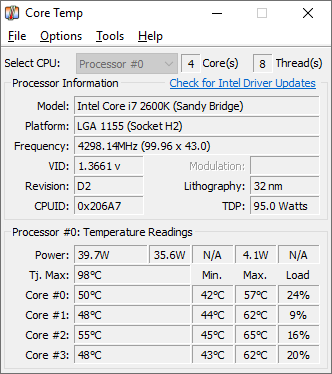
CPU temp when I booted up tonight was around 40°C but was rising quickly. Ran the CoreTemp program with this result...

CoreTemp-Scr.png


Something is connected to the Water Pump Header but due to cable management it's impossible to say exactly what.
 
Thanks for trying to help. Not sure that I'm confident enough to play about with my BIOS settings too much.

CPU temp when I booted up tonight was around 40°C but was rising quickly. Ran the CoreTemp program with this result...

View attachment 151081


Something is connected to the Water Pump Header but due to cable management it's impossible to say exactly what.

Your water pump is either..

Not connected or has failed completely.

My guess would be a failure mate, you shouldn't be running it with a busted water pump, it's correct that the cpu has some protection but not to that degree.

A replacement air cooler for your cpu is about £20 from Amazon if you know how to replace it, I don't drive I'd do it for you otherwise.

Screenshot 2025-03-26 at 21-36-17 Cooler Master Hyper H412R CPU Air Cooler - Low-Profile Cooli...png
 
Your water pump is either..

Not connected or has failed completely.

My guess would be a failure mate, you shouldn't be running it with a busted water pump, it's correct that the cpu has some protection but not to that degree.

A replacement air cooler for your cpu is about £20 from Amazon if you know how to replace it, I don't drive I'd do it for you otherwise.

View attachment 151096
Much obliged for your help.
 
Thanks for trying to help. Not sure that I'm confident enough to play about with my BIOS settings too much.

CPU temp when I booted up tonight was around 40°C but was rising quickly. Ran the CoreTemp program with this result...

View attachment 151081


Something is connected to the Water Pump Header but due to cable management it's impossible to say exactly what.
Yikes, I'd agree with Mexico and stop using it until it's sorted. A decent air cooler would probably be fine for you if the water cooler is goosed. Can I ask, what is your main usage?
 
Your water pump is either..

Not connected or has failed completely.

My guess would be a failure mate, you shouldn't be running it with a busted water pump, it's correct that the cpu has some protection but not to that degree.

A replacement air cooler for your cpu is about £20 from Amazon if you know how to replace it, I don't drive I'd do it for you otherwise.

View attachment 151096
I have one of these that i took out of mine to upgrade and can give it for free, but surely this one should be a 'go back to whoever built it'. That's a decent enough cooler, if he's getting fan errors then it should be going back under warranty (assuming it still is in it).
 
I have one of these that i took out of mine to upgrade and can give it for free, but surely this one should be a 'go back to whoever built it'. That's a decent enough cooler, if he's getting fan errors then it should be going back under warranty (assuming it still is in it).

It should definitely go back most manufacturers offer a solid guarantee/warranty . We don't know if it's an unplugged cable yet though so it's best to hold fire.

Hopefully it's a cable that has worked loose.
 
Last edited:
I have one of these that i took out of mine to upgrade and can give it for free, but surely this one should be a 'go back to whoever built it'. That's a decent enough cooler, if he's getting fan errors then it should be going back under warranty (assuming it still is in it).
That CPU launched October 2018 so probably well outside any warranty I'd have thought.
 
Computers have water pumps , where does the hose attach,
There was a fad in the 00s and 10s of running pc's way above specs, overpowering the components. Cooling became a big issue.

However it's mostly redundant now as modern tech performs so much better without needing the power.

So replacing the water pump here with a standard air cooler should work fine.
 
I have one of these that i took out of mine to upgrade and can give it for free, but surely this one should be a 'go back to whoever built it'. That's a decent enough cooler, if he's getting fan errors then it should be going back under warranty (assuming it still is in it).
It's been six years since I bought it so that's not an option.

Thanks to all who've offered up suggestions and helpful advice. Getting it taken in to PC XPress in Sale tomorrow for them to take a look at/fix.
 

Don't have an account? Register now and see fewer ads!

SIGN UP
Back
Top