North Stand expansion | Trial Event - Wed 20th May (p110)

Currently on hold using Apple call assistant, prediction is 45mins, Will post what they say as information for others
The bad news is they are having to send me an email, which I've just received worked perfect I now have a dayglo yellow ticket in my Apple Wallet

I asked about others having to call and she said I guess so

Check emails and if not recived then you may have to call
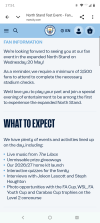
 
Not received an email yet to allow me to download the ticket. The original communication said that this would be the method. Also said free parking communication coming but again heard nothing.
 
Not received an email yet to allow me to download the ticket. The original communication said that this would be the method. Also said free parking communication coming but again heard nothing.
Just been told that emails are going out today and some tomorrow. Leaving it a bit late ffs especially now I know my HOTMAIL email address is bouncing some City emails. (any from noreply@ emails ) I changed my email to another one so hope that works.

They'll let you in with your phone confirmation or printed order confirmation. (Er allegedly)
 
Last edited:
Just been told that emails are going out today and some tomorrow. Leaving it a bit late ffs especially now I know my HOTMAIL email address is bouncing some City emails. (any from noreply@ emails ) I changed my email to another one so hope that works.

They'll let you in with your phone confirmation or printed order confirmation.
Thanks for the update..
 
Just been told that emails are going out today and some tomorrow. Leaving it a bit late ffs especially now I know my HOTMAIL email address is bouncing some City emails. (any from noreply@ emails ) I changed my email to another one so hope that works.

They'll let you in with your phone confirmation or printed order confirmation. (Er allegedly)
Just replied to you on another thread but try the following:-

You can force the email into your inbox using a custom rule.
  1. Go to the Settings (Gear icon) > Mail.
  2. Click on Rules, then select Add new rule.
  3. Name your rule (e.g., "Allow Noreply").
  4. Under Add a condition, choose Sender address includes and type noreply.
  5. Under Add an action, select Move to and choose Inbox.
  6. Click Save.
 
Mine has just let me upload, been trying every couple of hours, straight into Apple wallet this time.
 
Just replied to you on another thread but try the following:-

You can force the email into your inbox using a custom rule.
  1. Go to the Settings (Gear icon) > Mail.
  2. Click on Rules, then select Add new rule.
  3. Name your rule (e.g., "Allow Noreply").
  4. Under Add a condition, choose Sender address includes and type noreply.
  5. Under Add an action, select Move to and choose Inbox.
  6. Click Save.
Worked perfect

Plus bright yellow (or green? My eyes are fucked ) ticket arrived and downloaded

Happy days
 
Is there any mention of parking on site ?
I’m sure when was initially advertised it said free onsite parking
Can’t see anything now ?
 

Don't have an account? Register now and see fewer ads!

SIGN UP
Back
Top