Constant Privacy Pop-up.

Can I just check, you are clicking "Agree" when the pop-up appears?

If not, if you could either reply in here or PM me letting me know what device, browser etc you're using that'd be a great help.

Apologies about this, hopefully we can get it sorted sooner rather than later.
I am getting it every page refresh Huawei p30 on chrome
 
Might’ve been easier to ask who isn’t having any problems!

Think I might’ve worked out something that was causing an issue. Not sure if it will fix it for everyone, but if you’re still having issues, please can you try clearing your cache and then clicking “Accept” when the pop-up first appears.
No difference unfortunately.
 
Do you still get the same problem if you use a different browser or device?
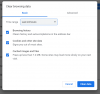
Fixed it. Totally my fault. Everyone on Chrome make sure you're selecting "all time" in the time range dropdown below. The default is last 24 hours. Thanks @Ric!

Capture.PNG
 
  • Like
Reactions: Ric
I'm getting it on my samsung galaxy tab. Using samsung internet.
But dont get it on my iPhone.

Edit* Think I've now sorted it.
I'd cleared it in the general settings, still did it.
Then I cleared it in Samsung internet which seems to have fixed it.
 
Last edited:

Don't have an account? Register now and see fewer ads!

SIGN UP
Back
Top