Youtube Sucks

If you’re watching on the app on tv or Apple, when the ad starts just click up to info and then say stop seeing this ad and then return to video. It’s annoying still but means it’s only a 3 or 4 second break rather than having to watch the whole ad(s).
I actually didn't even try this until reading your post. Much better now. Occasionally the info thing isn't shown but it's rare.

Thanks for the tip!
 
I’ve finally caved and given the cunts my money for a premium subscription. I watch more shite on YouTube than other tv so it’s probably worth it.

Can find myself watching hours of instructional videos on how to do car repairs and shit on vehicles I don’t even own haha. Then I take the piss out of the mrs for watching tiktok and stuff.
 
I’ve finally caved and given the cunts my money for a premium subscription. I watch more shite on YouTube than other tv so it’s probably worth it.

Can find myself watching hours of instructional videos on how to do car repairs and shit on vehicles I don’t even own haha. Then I take the piss out of the mrs for watching tiktok and stuff.
Have yer watched that guy diggin' up dozens of bottles from a backyard in South Dakota, Oklahoma, Florida. Didn't they get down to Mad Eyed Screamer's back yard and he had buried a pile o' Boddies bottles? Fellah diggin' 'em up was totally bemused.
 
I've been avoiding YouTube lately because the ads make it almost impossible to watch anything without constant interruptions. Honestly, though, I haven’t had much time for it anyway since I’ve been more focused on my studies. To manage my workload, I got some help from a fantastic service, and I’ve been really impressed with the quality. If you're curious, you can see for yourself—they’ve done an amazing job and have really helped me stay on top of my assignments
 
Last edited:
If you have an android phone search YouTube Vanced. It's a patch for the default app that gives you all the functionality of YouTube Premium for free. It sounds harder to install than it actually is. I managed to have it up and running in under 10 minutes and I'm pretty thick.
 
I’ve just downloaded that Brave browser app, looks a bit like Salford City’s badge though. The text on it is huge n’all.
 
I've been using Brave for years. Dread to think how bad YouTube ads are nowadays.

If you didn't know and use it on your phone you can add YouTube via Brave to your home screen so it's like an app. And it also allows you to play YouTube with your screen off/locked or in the background, which is also very useful.

It also blocks ads on X, so I don't use the X app either. Brave X app instead.

And it's great for streaming matches as it fucks off all the ads and pop ups.
 
  • Like
Reactions: PPT
I've been using Brave for years. Dread to think how bad YouTube ads are nowadays.

If you didn't know and use it on your phone you can add YouTube via Brave to your home screen so it's like an app. And it also allows you to play YouTube with your screen off/locked or in the background, which is also very useful.

It also blocks ads on X, so I don't use the X app either. Brave X app instead.

And it's great for streaming matches as it fucks off all the ads and pop ups.

How do you do this?
 
If you're on Android, download the Brave app. (not sure about iPhone)

Bring up YouTube in Brave app.

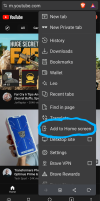
Then the 3 buttons in the bottom right corner and select add to home screen.

View attachment 134717

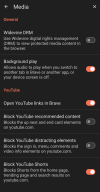
Then select settings, scroll down to Media and toggle the background play.

View attachment 134718
Ah thanks - unfortunately I've got an iphone and there's no option to to do this
 
If you're on Android, download the Brave app. (not sure about iPhone)

Bring up YouTube in Brave app.

Then the 3 buttons in the bottom right corner and select add to home screen.

View attachment 134717

Then select settings, scroll down to Media and toggle the background play.

View attachment 134718
This has literally just improved my life a million fold, thankyou!!
 
If you're on Android, download the Brave app. (not sure about iPhone)

Bring up YouTube in Brave app.

Then the 3 buttons in the bottom right corner and select add to home screen.

View attachment 134717

Then select settings, scroll down to Media and toggle the background play.

View attachment 134718

Legend. Someone at work recommended this to me the other week, but haven't got round to it yet. Will sort it over the weekend now. Cheers
 
A bit more involved but i have a DD_WRT capable spare router (It runs firmware not intended for it to run adding functionality it was not intended. (strictly speaking I think its a small linux distro)https://dd-wrt.com/

A Pi-Hole works similar magic which can be a lot easier to work on
 
If you're on Android, download the Brave app. (not sure about iPhone)

Bring up YouTube in Brave app.

Then the 3 buttons in the bottom right corner and select add to home screen.

View attachment 134717

Then select settings, scroll down to Media and toggle the background play.

View attachment 134718
Only problem I'm finding with this is you can't stream it the tv? Without screen mirroring your whole phone?
 
A bit more involved but i have a DD_WRT capable spare router (It runs firmware not intended for it to run adding functionality it was not intended. (strictly speaking I think its a small linux distro)https://dd-wrt.com/

A Pi-Hole works similar magic which can be a lot easier to work on
and in English......
 

Don't have an account? Register now and see fewer ads!

SIGN UP
Back
Top